
Klik Touchpoints Migration
into Bizzabo
I led the migration of Touchpoints used on sponsor and exhibitor collateral into the Bizzabo EMS, enhancing setup and deployment for a self-serve experience on desktop and iPad. Attendees receive exclusive content in their mobile app when interacting with a Touchpoint via their event badge.


Klik is a Toronto-based smart wearables company acquired by Bizzabo in 2021. Migrating Touchpoints into Bizzabo was part of a larger growth initiative I led to establish Klik as a key differentiator.
Problem Definition


Gathering Context
Unfamiliar with Touchpoints, I first gathered client and marketing materials. Then, I mapped all existing Klik features and interfaces in Miro, documenting friction points, open questions, data discrepancies and suggestions.
Research Planning
I created separate interview questionnaires for two main personas: onsite project managers and onsite technicians. I defined research objectives and specific learning goals to understand their roles, responsibilities, setup and deployment processes, collaboration, and points of friction.
Objective 1
How do technicians use the Klik app to deploy and monitor touch points?
Objective 2
What points of friction do they have with the app or with project managers?
Current nature of touchpoint setup and behavior creates errors and confusion
Configuration and deployment process is tedious, manual and unpleasant
Hard to relate touchpoint context.
Project managers take on tech and organizer role
Current nature of touchpoint setup and behavior creates errors and confusion
Configuration and deployment process is tedious, manual and unpleasant
Hard to relate touchpoint context.
Project managers take on tech and organizer role
Qualitative Analysis
After interviewing project managers and technicians, I analyzed my findings using affinity mapping in Dovetail to generate insights. I then suggested key usability enhancements to PMs and stakeholders, prioritizing them by impact and effort. I was then able to refine the problem statement
Mapping Touchpoints Workflow in the Event Timeline
After analyzing the process, I mapped the persona journey within the event timeline, highlighting jobs to be done and pinpointing where usability issues emerged.

Problem Statement
Onsite project managers and technicians must manually label, track, and monitor touchpoints during live events, leading to frequent errors and inefficiencies. Organizers rely on them to make corrections, adding to the already challenging workload and increasing the risk of inaccurate data.

UX Scoping
I worked closely with my Product Manager and engineering to define UX requirements. I suggested high impact enhancements to help achieve a self-serve experience. From my recommendations, these were included in phase one of development.
Unique assigned Touchpoint ID for desktop and iPad
Device status indicators - active status and proxy
Touchpoint mobile preview for desktop and iPad
Override confirmation process for false detection
Device notes for technicians on iPad
UX and Wireframing
Onsite Technicians

iPad management

Device deployment
Ideating concepts across platforms for all personas
I designed different concepts for Touchpoint setup: the dashboard focused on creation and oversight for project managers, while the iPad app provided a granular breakdown for technicians to deploy, monitor, and track devices. Overlapping elements like touchpoint ID and location notes facilitated information sharing between managers and technicians.
Device deployment
iPad management
Onsite Technicians
iPad management
Device deployment
Onsite Project Managers

Dashboard management

Touchpoint creation
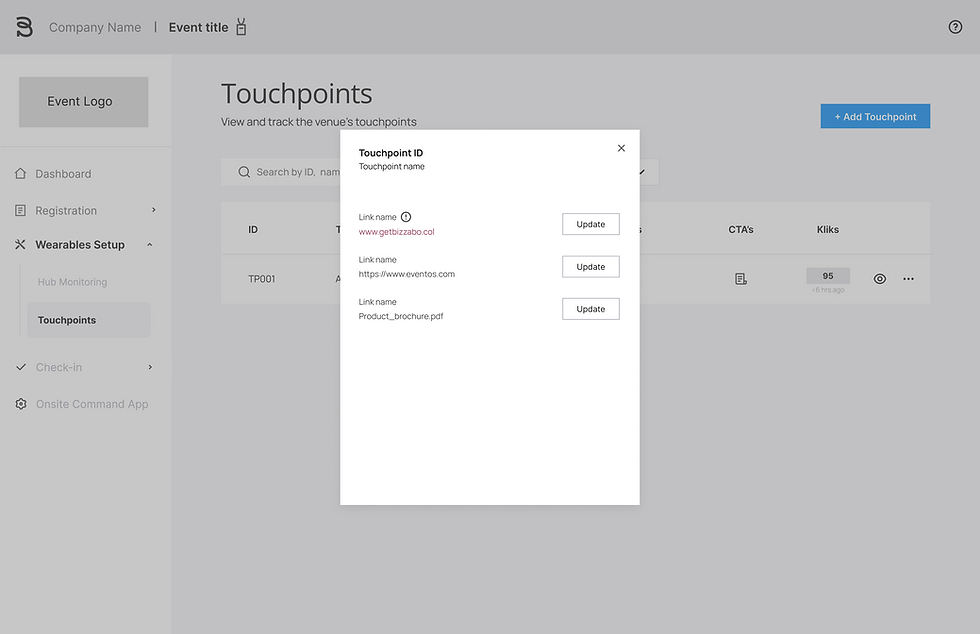
CTA management
Final Design


Onsite Command Dashboard
Project Managers
Creation
As project managers create Touchpoints in the dashboard, they are automatically assigned a unique ID
Managment & Tracking
Project managers can manage touchpoints and have status indicators to alert techs. to potential issues
Device and Mobile preview
Clicking the preview icon gives project managers a device and mobile preview, facilitating client communication
Onsite Command iPad app
Onsite Technicians
Data sync
Data sync between dashboard and iPad eases PM / Tech communication and context transfer
Deployment
Technicians can deploy more than one device per touchpoint
Granular device preview
An inner device screen shows detailed info, including proxy and online status, and allows techs to add device notes.

Impact
Klik Expansion ACV up by 21%
Klik named key differentiator by gartner magic quadrant